


The answer upfront: Six out of ten beginners who buy equipment before securing a venue go out of business within the first year. VR World in Maidstone, UK, bought the machines, signed the lease, then got into a rent dispute and shut down shortly after opening. Two Bit Circus in Dallas had top-tier equipment but chose a location completely mismatched with their target audience and closed in less than a year. Tens of thousands of dollars in hardware turned into dead stock before they even had a proper launch.
This is not scare talk. The right sequence for opening a VR cinema is simple: lock the venue first, then match the equipment to it. Location determines foot traffic. Foot traffic determines revenue. Revenue determines whether you survive year one. Reverse the order, and even the best machines become expensive storage.
VR cinema is a foot-traffic business. A single simulator at full capacity handles maybe 20–30 people per hour. If your venue gets no walk-ins, the hardware performance doesn't matter.
VR Star Space offers a full range of equipment, from 2-seat to 48-seat systems, including 2-Seat VR UFO, 4-Seat Star VR Cinema, and the expandable Star VR Ship. They have helped over 5,000 partner stores successfully operate in more than 100 countries. But no matter how advanced your machine, the customer’s first step inside depends on location, not a billboard, not a social media ad, just where you are placed.
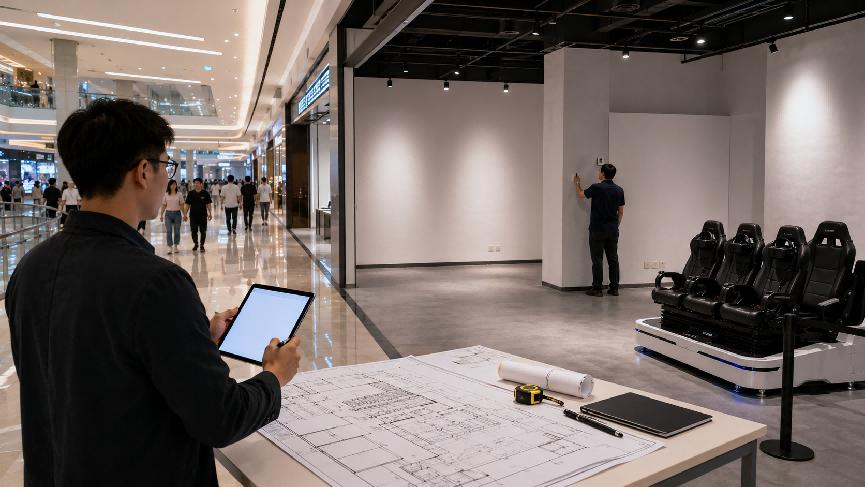
1. Buying Equipment First, Then Looking for a Venue — Three Hidden Risks
Many newcomers are tempted by limited-time discounts and order machines before they have a space, dreaming of a prime spot in a busy mall. But here is what they miss.
| Hidden Risk | Why It Happens | Business Impact |
|---|---|---|
| Machine does not fit the floor plan | VR simulators need safe operating clearance, queuing space, and circulation paths. | Layout rework can cost more than expected and delay opening. |
| Power and floor loading cannot handle it | Commercial VR cinema systems may require industrial power, stronger flooring, and ventilation. | Electrical upgrades and floor reinforcement may become major hidden costs. |
| Poor location cuts revenue | A spot 30 meters away from the main traffic path can sharply reduce walk-ins. | Low ticket volume turns equipment into a monthly expense instead of a revenue engine. |
Risk 1: The Machine Does Not Fit the Floor Plan
This is the most common killer. VR simulators are not TVs you can shove into a corner. Each unit needs safe operating clearance, queuing space, and circulation paths. A 5-Seat VR UFO with 360° wireless swivel and multiple special effects looks great, but if the space you eventually find cannot accommodate the clearance and queue area, you will spend more reworking the layout than expected.
Risk 2: Power and Floor Loading Cannot Handle It
A 4-Seat Star VR Cinema weighs 1,200 kg, draws 3 kW, and requires a 220V industrial power setup. Most standard retail spaces are not wired or built for that. Forced connections cause tripped breakers or burned panels. Forced placement cracks floors and can even compromise structural safety.
Risk 3: Poor Location Halves Your Revenue — or Worse
A VR cinema in the US moved from a dead corner to the main entrance of the same mall and tripled daily plays. A spot 30 meters away can cut foot traffic by 70% during off-peak hours. If your machine is tucked away and sells only a few tickets a day, no VIP package will fix your cash flow.
When these risks stack up, the numbers stop working. VR equipment requires monthly maintenance and content updates, and the machine becomes a pure expense from day one. Without a steady stream of customers, your cash dries up fast.
2. Find the Venue First, Then Match the Equipment — The Right Sequence
Benefit 1: Precision Equipment Matching
A 60 sqm space might be perfect for one 4-Seat Star VR Cinema plus a waiting area and checkout counter. A 100+ sqm space could combine a 2-Seat unit and a 4-Seat unit for simultaneous play. VR Star Space offers everything from 2-seat to 48-seat configurations, so you can choose the exact machine that fits your actual floor plan, not the other way around.
Benefit 2: Use Venue Data to Calculate ROI
Do not guess your revenue. Once you have a potential space, spend a week counting: how many people walk by on weekdays, what is the peak weekend traffic, and what competing entertainment options are within 500 meters. Real data gives real forecasts and saves you from a money-pit decision.
Benefit 3: A Signed Lease Gives You Negotiating Power
When you walk into a supplier with a signed lease in a high-traffic location, you are no longer just asking “how much for one machine.” You are offering a proven sales channel. This can unlock better terms, not just pricing, but also promotional setups, co-marketing, and flexible partnership models.
3. Two Real-Life Examples of Getting the Order Wrong
| Case | What Went Wrong | Lesson for Beginners |
|---|---|---|
| VR World, Maidstone, UK | Bought quality equipment but underestimated rent burden and cash flow pressure. | The machines were fine; the rent-to-revenue ratio was not. |
| Two Bit Circus, Dallas, USA | Had excellent equipment but selected a location mismatched with the target audience. | Great hardware plus the wrong place still means weak repeat business. |
The painful truth is simple: great hardware plus the wrong place equals zero repeat business. Before buying machines, operators should validate whether the location can support the revenue needed to cover rent, labor, maintenance, and content updates.
4. Your Action Plan: The ARENA Framework
Follow this four-stage sequence to launch without costly mistakes:
| Stage | Action | What to Check |
|---|---|---|
| A — Assess the market | Spend 1–2 weeks studying your local commercial district. | Target customer, budget, weekday traffic, weekend traffic, holidays, peak hours, dwell time. |
| R — Real Estate | Shortlist 2–3 potential spaces and compare rent terms. | Permitted use, power capacity, floor loading, ventilation, lease clauses. |
| E — Equipment Mapping | Match the exact floor plan and technical limits to the right machine. | 2-Seat VR UFO for tight spaces, 4-Seat Star VR Cinema for mid-sized kiosks, Star VR Ship for flagship stores. |
| N — Negotiate & Deploy | Use foot-traffic data as leverage when negotiating with the supplier. | Price, delivery, installation, training, promotional support, launch schedule. |
| A — Aftercare | Track revenue per square meter and machine utilization after opening. | Renew lease, move to a better spot, add more simulators, or optimize operations. |
5. Equipment Matching Reference
| Equipment Type | Suggested Scenario | Planning Notes |
|---|---|---|
| 2-Seat VR UFO | Small mall space or compact entertainment corner | Approx. 4.9㎡ footprint; still needs queue and safe circulation space. |
| 4-Seat Star VR Cinema | Mid-sized mall kiosk or FEC entry project | Approx. 5.8㎡ footprint, 1,200 kg, 3 kW; confirm floor loading and 220V power. |
| Star VR Ship | Flagship store or larger entertainment venue | Expandable from 9 to 48 seats; requires full-store circulation and stronger venue planning. |
6. Summary
A VR cinema makes money not because you bought expensive equipment, but because you put the right equipment where people already walk. A machine can wait a year to be installed. A lease cannot. Rent starts the day you sign.
The winning sequence is: count the people, lock the space, then buy the hardware that fits. VR Star Space’s 5,000+ successful stores across 100+ countries prove one thing: equipment is a tool, but venue and foot traffic are the true business engine. The first data sheet from a potential location is worth more than any promotional discount on a machine you install blind.
FAQs
Q1: Can I install a VR simulator myself? My friend knows computers.
Computer knowledge is not the issue. Commercial VR installations require proper electrical wiring, often 220V industrial, controller calibration, game system activation, motion seat alignment, and for multi-seat systems, synchronisation and serial port debugging. VR Star Space provides pre-shipment video/photo confirmation and offers installation guidance and on-site technician dispatch. It is strongly recommended to have supplier-supervised first installation; do not risk it alone.
Q2: How much floor space do I need for different VR cinema sizes?
Minimum: 2-Seat VR UFO occupies about 4.9㎡ and comes with 41+ games. Mid-size: 4-Seat Star VR Cinema dimensions are 3445×1692×2289mm, and at least 15–20㎡ is recommended to include queuing and point-of-sale. Large: Star VR Ship expandable to 48 seats needs a full store zone with proper circulation. Always measure your exact space before selecting the model.
Q3: Where does the major cost lie — equipment or rent?
Equipment is a one-time capital expense. Rent is a recurring operating cost. Over a 2-year period, rent often becomes the largest line item. There is a blunt industry saying: “If you get the rent wrong, the equipment will never pay for itself.” Before signing any lease, review base rent, CAM charges, escalation clauses, and early termination conditions.
Q4: Will a multi-player VR cinema lose popularity if the games become stale?
Yes. Hardware is a vessel; content is the lifeblood. VR Star Space ships the 4-Seat cinema with 122+ games and releases new versions continuously. Each content drop can be marketed as a seasonal refresh. If your supplier does not have a committed content update plan, you must budget for a second-source content library.
Q5: Can I lease VR equipment instead of buying it for my first location?
You can, but it is rarely advisable for a beginner. Lease contracts typically require large security deposits, often more than buying a mid-range machine, and leased machines are usually entry-level models that cannot differentiate your venue. A smarter approach is to buy 1–2 core units for your first store, prove the model, then use positive cash flow or bank financing backed by operational records to expand.
Post time: 2026-05-06 10:45:34










 sales@vrstarspace.com
 +86 177 5195 7805
 +86 177 5195 7805
  Privacy settings