


Your young guests crave thrills, but installing a real roller coaster indoors sounds like a fast track to chaos, noise complaints, and a budget that screams louder than the kids ever could.
Virtual roller coaster solutions deliver big excitement in small spaces, boosting engagement and revenue while keeping operations safe and manageable, as supported by industry research from IAAPA’s digital attractions report: https://www.iaapa.org/news/funworld/virtual-reality-coming-age-location-based-entertainment.
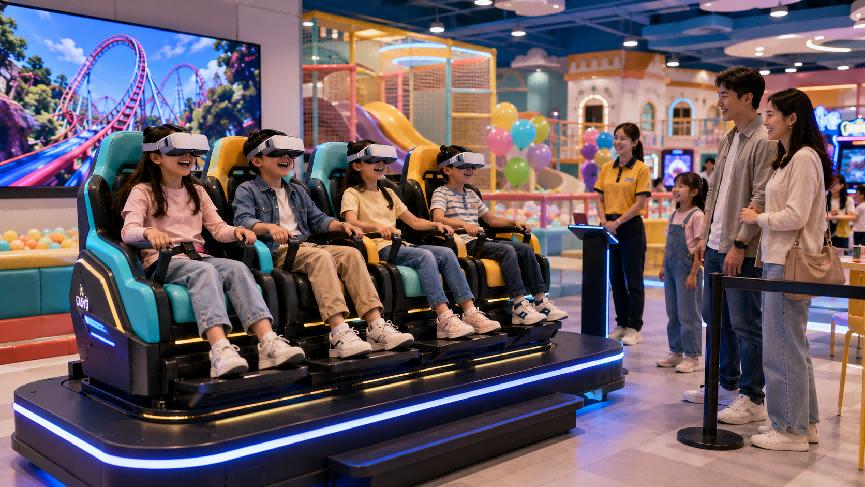
Why Indoor Play Centers Need Kids Virtual Roller Coaster Attractions
Kids virtual roller coasters turn unused corners into thrilling, ticketed attractions. They draw families, increase dwell time, and keep children safely entertained in all weather.
With bright content, low noise, and soft movements, these rides fit perfectly beside soft play, arcades, and birthday party zones in busy indoor play centers.
1. Boosting Foot Traffic and Repeat Visits
Eye‑catching VR coaster setups act as strong anchors that parents notice from the entrance, encouraging longer stays and repeat visits on quiet weekdays.
- Ideal for membership upsells.
- Pairs well with party packages.
- Promotes sharing on social media.
2. Creating New Revenue Streams
Use time‑based tickets or bundled passes to increase per‑child spend without raising general entry prices, keeping your center competitive and family‑friendly.
- Pay‑per‑ride pricing.
- Bundle with snacks or tokens.
- Seasonal coaster themes.
3. Flexible Themes for All Ages
From gentle cartoon rides to calm space flights, you can match ride intensity to different age groups while keeping the space visually consistent and inviting.
| Age Group | Recommended Style |
|---|---|
| 4–6 | Slow, colorful tracks. |
| 7–10 | Medium speed adventures. |
| 11–12 | Action and mission themes. |
4. Perfect Match with VR Star Space Solutions
Systems like the VR Star Space 9D Virtual Reality Movie Cinema 4 Seats Virtual Reality Shooting Game Simulator let kids enjoy immersive coasters and games with safe movements and shared seating.
Educational and Sensory Benefits of Virtual Roller Coasters for Children
Modern kids virtual roller coasters do more than entertain. They support learning, balance, and focus while keeping children motivated through playful missions and simple goals.
Short rides can gently train reaction speed, visual tracking, and decision‑making, all inside a safe, supervised indoor playground environment.
1. Supporting Cognitive Growth
Children follow paths, remember patterns, and react to obstacles. These simple tasks help build problem‑solving skills and improve working memory in a playful way.
- Pattern spotting.
- Short‑term memory use.
- Goal‑oriented thinking.
2. Sensory Integration and Balance
Gentle motion, sound, and visual cues help kids train balance and body awareness, especially when rides sync vibrations with track turns and speed changes.
3. Social and Emotional Skills
Shared coaster rides teach turn‑taking and patience. Children cheer each other on, share scores, and learn to handle mild excitement in a safe way.
| Skill | Observed Effect |
|---|---|
| Turn‑taking | Improves queue behavior. |
| Confidence | Kids try new rides. |
| Cooperation | Team challenges grow. |
4. Linking Fitness and Fun
The VR Star Space VR Amusement Game Machine Fitness 9D VR Motion Sport Virtual Reality Ride Bike Simulator blends cardio exercise with game‑like riding, helping kids enjoy movement without feeling forced to “work out.”
Essential Safety Features for Children’s Virtual Roller Coaster Experiences
Safety is the top priority for kids virtual roller coasters in any indoor play center, from motion control to staff training and hygiene.
1. Child‑Friendly Hardware and Restraints
Choose machines with soft edges, secure seat belts, and low platform heights so children can board and exit safely with minimal risk.
- Adjustable safety belts.
- Non‑slip flooring.
- Rounded corners.
2. Clean and Hygienic VR Gear
VR headsets need easy‑wipe surfaces, disposable eye masks, and clear cleaning routines to reassure parents and keep kids healthy.
| Task | Frequency |
|---|---|
| Headset wipe‑down | After every ride. |
| Deep clean | Daily. |
| Safety check | Weekly. |
3. Smart Motion and Content Limits
Use kid‑safe speed, simple visuals, and age filters to avoid motion sickness or fear while still keeping the virtual coaster experience exciting and fun.
Space-Saving Design Ideas for Installing VR Star Space Attractions
Even compact indoor play centers can add kids virtual roller coasters by planning zones, cable paths, and queue lines with care.
1. Corner and Wall-Based Layouts
Install units like the VR Star Space 2 Seats VR UFO Interactive Virtual Reality Flight Game 360 Cinema VR Game Machine in corners to free central floor space for free play.
2. Multi-Use Waiting Areas
Design queues with benches, lockers, or photo spots so parents and kids wait comfortably while you also promote other attractions or snack combos.
- Photo walls near the ride.
- Info screens with offers.
- Compact shoe or bag racks.
3. Smart Cable Management and Noise Control
Hide power and network lines under mats or trunking. Add soft wall panels to reduce sound so nearby toddler areas stay calm and relaxed.
Integrating VR Star Space Coasters into Existing Indoor Play Zones
Integrate kids virtual roller coasters into your current layout so they complement, not compete with, soft play and arcade attractions.
1. Clear Zoning by Age and Intensity
Place VR coasters near older kids’ climbing frames while keeping toddler areas quieter. Clear signs help parents guide children to the right zone.
2. Bundled Tickets and Party Packages
Include VR rides in birthday or group packages to boost bookings and give party hosts a “wow” moment that feels premium yet safe.
| Package | Includes |
|---|---|
| Standard | 1 VR ride + play pass. |
| Premium | 3 VR rides + snacks. |
| Group | Shared ride cycles. |
3. Staff Training and Simple Operations
Train staff in quick headset fitting, calm child support, and basic troubleshooting so rides run smoothly and queues move fast all day.
Conclusion
Kids virtual roller coasters give indoor play centers a strong, modern draw while staying compact, safe, and easy to theme for different ages.
By choosing VR Star Space systems and planning zones, safety, and pricing carefully, operators can grow revenue, improve learning value, and delight families year‑round.
Frequently Asked Questions about Virtual Roller Coasters for Kids
1. From What Age Can Children Use Kids Virtual Roller Coasters?
Many centers start from age five or six, depending on height and headset fit. Always follow the manufacturer’s guidelines and your own safety policy.
2. Are Virtual Roller Coasters Safe for Children’s Eyes?
Short, supervised sessions with kid‑friendly content are generally considered safe. Encourage breaks between rides and avoid long continuous play periods.
3. How Long Should Each VR Ride Last?
Most indoor play centers keep rides between three and seven minutes. This reduces motion sickness risk and keeps queues moving smoothly.
4. Can Virtual Roller Coasters Help Kids Who Are Shy or Anxious?
Yes. Gentle rides can slowly build confidence. Let shy children watch first, then try calmer scenes with supportive staff and parents nearby.
5. What Maintenance Do VR Coaster Systems Need?
Regular cleaning, daily visual checks, and scheduled technical servicing are key. Follow the vendor’s maintenance plan and keep a simple logbook.
Post time: 2026-02-18 23:14:03










 sales@vrstarspace.com
 +86 177 5195 7805
 +86 177 5195 7805
  Privacy settings