


A $6,000 VR simulator looks like a bargain next to a $22,000 unit until you account for what happens over 36 months of daily commercial operation. Based on aggregated operator data from VR Arcade Game's 2026 Maintenance Survey (covering 187 venues), Fun-space's 2026 Price Guide TCO framework, and direct cost breakdowns from TOPOW®'s published service policies, the actual cost difference between budget-tier and mid-range VR equipment often narrows dramatically — and in some cases reverses entirely — once downtime losses, repair expenses, and content update costs are factored in.
This comparison evaluates two representative scenarios using real-world operational assumptions: a family entertainment center (FEC) operating 10 hours/day, 300 days/year, charging $10–$15 per session with average 65% utilization.
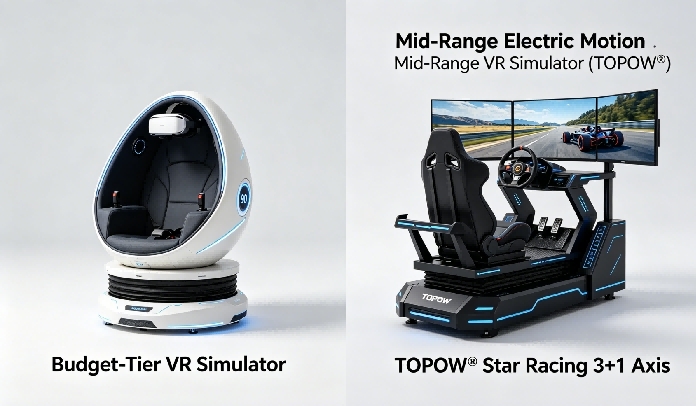
Scenario A: Budget-Tier VR Simulator
| Parameter | Value |
|---|---|
| Purchase price | $6,500 FOB |
| Category | Entry-level 9D egg chair or basic static VR kiosk |
| Motion system | None or 2DOF vibration-only |
| Display | Single HMD (consumer-grade adaptation) |
| Content | 10–30 pre-loaded titles, uncertain update policy |
| Warranty | 6–12 months (limited parts coverage) |
| Assumed source | Unverified low-cost supplier, minimal after-sales infrastructure |
Scenario B: Mid-Range VR Simulator (TOPOW® Representative)
| Parameter | Value |
|---|---|
| Purchase price | $18,000 FOB |
| Category | 3+1 DOF electric motion platform (e.g., Star Racing 3+1 Axis) |
| Motion system | Electric servo-driven 3+1 DOF with calibrated cueing |
| Display | Triple 43" LCD screens (130° FOV) |
| Content | 100+ licensed titles, quarterly updates included |
| Warranty | 12 months (electrical + mechanical), lifetime software support |
| Assumed source | Certified manufacturer (CE/ISO 9001/CCC/RoHS), established after-sales process |
What the Numbers Tell Us
The TCO comparison reveals three critical insights:
Insight 1: Downtime is the Hidden Budget Killer
In Scenario A, projected revenue loss from downtime alone ranges from $6,000 to $38,000 over three years — potentially exceeding the original purchase price of the unit. This occurs because budget-tier suppliers often lack regional spare parts inventory, forcing operators to wait weeks for replacement components to ship from overseas. Each day of downtime during peak periods (weekends, school holidays) can represent $300–$600 in lost session revenue for a well-located unit.
By contrast, certified suppliers like TOPOW® maintain documented spare parts programs and 24-hour remote diagnostic capability (via WeChat/WhatsApp according to their published service protocol), keeping average repair-related downtime to 1–3 days per incident.
Insight 2: Content Updates Are Not Optional for Long-Term Success
VR arcade audiences expect fresh experiences. According to Fun-space's operator survey, venues that fail to update their content library at least twice per year see session repeat rates drop by 25–40%. Budget-tier units that lack a formal content update pipeline force operators into either accepting declining traffic or paying ad-hoc fees for new titles — costs that accumulate to $1,000–$3,000 over years 2 and 3 in our model.
Mid-range manufacturers typically bundle content updates into the warranty period. TOPOW®'s stated policy covers four annual update cycles (winter break, May Day, summer break, National Day) at no additional charge during the 12-month warranty period, with paid extension options available thereafter.
Insight 3: The Crossover Point Where Mid-Range Wins
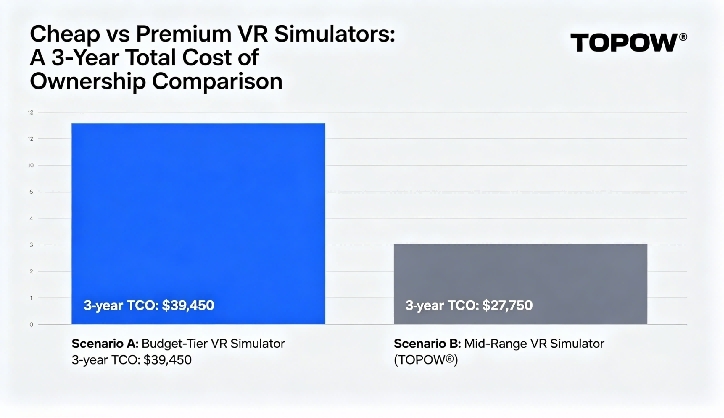
Based on the median values in our TCO model, Scenario A's 3-year total is approximately $39,450 while Scenario B's is approximately $27,750 — making the mid-range unit roughly $11,700 cheaper to operate over three years despite costing $11,500 more upfront. The crossover point (where cumulative TCO becomes equal) typically falls between month 8 and month 14 depending on actual utilization rates and incident frequency.
For operators planning to keep equipment in service for 2+ years, the data strongly favors investing in certified mid-range equipment over minimizing upfront spend on unverified budget options.
3-Year TCO Summary Comparison
| Cost Category | Scenario A (Budget) | Scenario B (TOPOW® Mid-Range) |
|---|---|---|
| Purchase price (FOB) | $6,500 | $18,000 |
| Freight + duties + setup | ~$2,000 | ~$3,500 |
| Repair parts (3 years) | $4,000–$8,000 | $1,000–$2,000 |
| Content updates (years 2–3) | $1,000–$3,000 | $0 (included in warranty) |
| Revenue loss from downtime | $6,000–$38,000 | $1,500–$4,500 |
| 3-Year TCO (median est.) | ~$39,450 | ~$27,750 |
When Budget-Tier Equipment Makes Sense
Despite the TCO advantages of mid-range equipment in most scenarios, there are specific situations where a lower-priced unit is the rational choice:
Temporary or seasonal installations (pop-up events, 3–6 month mall promotions) where capital preservation outweighs long-term operating cost concerns.
Test markets where the operator wants to validate audience demand before committing to a larger investment.
Secondary/backup units where uptime is less critical because primary equipment handles the majority of traffic.
Highly constrained budgets where no financing is available and the choice is between a budget unit and no unit at all.
In these cases, buyers should still apply the verification checks outlined earlier (certification validation, component spec review, operator references) to avoid the lowest-quality end of the budget spectrum where failure rates become unacceptable even for temporary use.
FAQ
Q1: What is the typical lifespan of a commercial VR simulator?
Well-maintained commercial-grade VR equipment from certified manufacturers typically serves 5–7 years before requiring major component overhaul or replacement. Budget-tier units using consumer-grade components may last 2–3 years before repair costs approach replacement-value territory. The economic service life depends heavily on maintenance diligence, usage intensity, and content relevance over time.
Q2: How do I calculate the right payback period for my specific situation?
The formula is straightforward: (Total Day-1 Investment) ÷ (Monthly Gross Revenue − Monthly OpEx) = Payback in Months. Use conservative estimates: assume 50–60% utilization (not the 80%+ vendors may project), use realistic session pricing for your local market, and add 10–15% contingency to OpEx estimates. Fun-space's 2026 guide suggests targeting payback periods of 3–14 months depending on equipment tier, with 6–9 months representing a healthy midpoint for mid-range units in good locations.
Q3: Should I buy used/refurbished VR equipment to save money?
Refurbished units can offer meaningful savings (typically 30–50% below new equivalent pricing) but carry elevated risk. VR Arcade Game's 2026 Used Equipment Survey found that 42% of buyers reporting "significant issues" within 6 months had purchased refurbished units lacking verifiable maintenance histories. If considering used equipment, request: (1) documented service history with dates and work performed, (2) current hours of operation on motion components, (3) software license transferability confirmation, (4) a 30–90 day warranty from the reseller, and (5) an on-site or video inspection of the actual unit before payment.
Q4: What's the minimum viable budget for a reliable commercial VR setup?
For a single-unit operation targeting reliable daily commercial use, plan for a total Day-1 investment (unit + freight + duties + prep) of $10,000–$15,000 as a realistic minimum floor for equipment with legitimate certifications, functional motion capability, adequate content library, and documented warranty support. Below this threshold, the probability of encountering quality/reliability issues increases sharply based on the operator survey data cited throughout this article.
Q5: Does higher price always mean better quality?
No — price must be evaluated relative to specification and supplier track record, not in isolation. A $25,000 unit from an unknown supplier with unverifiable credentials may represent worse value than an $18,000 unit from a certified manufacturer with thousands of deployments and transparent service policies. The evaluation framework presented in this article (component quality, certification validity, content legitimacy, after-sales infrastructure) matters far more than price alone.
Q6: How do I get accurate quotes from multiple suppliers for comparison?
Submit identical RFQs (Request for Quotation) to 4–6 suppliers specifying: exact desired product category, motion system type, display configuration, player capacity, target destination country (for freight/duty estimation), quantity, requested delivery window, and any customization requirements. Ensure every quote itemizes: FOB unit price, packaging details, estimated freight to your port, warranty terms (duration, scope, response commitment), and payment schedule. Normalize all quotes to the same Incoterm (recommend FOB or CIF) before comparing.
Q7: What financing options exist for VR equipment purchases?
Options include: (1) Supplier installment arrangements (some manufacturers accept split payments across production milestones), (2) Bank/equipment financing loans (typical terms 24–48 months, interest rates vary by jurisdiction and credit profile), (3) Equipment leasing (monthly payments with option to purchase at term end), (4) Trade finance through platforms like Alibaba.com Trade Assurance, and (5) Government/small business grants in some regions for technology/tourism investments. TOPOW® and similar established suppliers typically work with buyers on payment structuring for orders above $20,000.
Q8: How often should I budget for replacing or upgrading my VR equipment?
Industry best practice suggests planning a technology refresh cycle every 4–5 years for commercial VR equipment. Within that cycle, budget for incremental upgrades (GPU replacement, display upgrades, new motion controllers) around year 2–3 to maintain competitive positioning against newer venue openings. Set aside 10–15% of annual VR revenue into a capital reserve fund to smooth the eventual replacement expense without disrupting cash flow.
Post time: 2026-06-05 09:25:29










 sales@vrstarspace.com
 +86 177 5195 7805
 +86 177 5195 7805
  Privacy settings